
Undo a merge
Undo takes a merge apart: the merged order goes away and your original orders come back. You review exactly what will change before anything happens.
Undo is not a full rewind. Some things a merge did can’t be taken back, such as a shipping refund or the email to your customer. The review lists them under Won’t be reversed so you can decide with the facts.
Undo one merge
Section titled “Undo one merge”- Open History and select the merge.
- Select Review undo. On a phone, it is under More actions.
- Read the page. The banner says Nothing will change until you confirm and when Mergify checked. Will be reversed lists what undo will do, Won’t be reversed lists what stays, and the side column shows the Expected result, either Reversed or Partially reversed.
- Select Undo reversible order changes. Back to merge leaves without changing anything, and Refresh reads Shopify again.
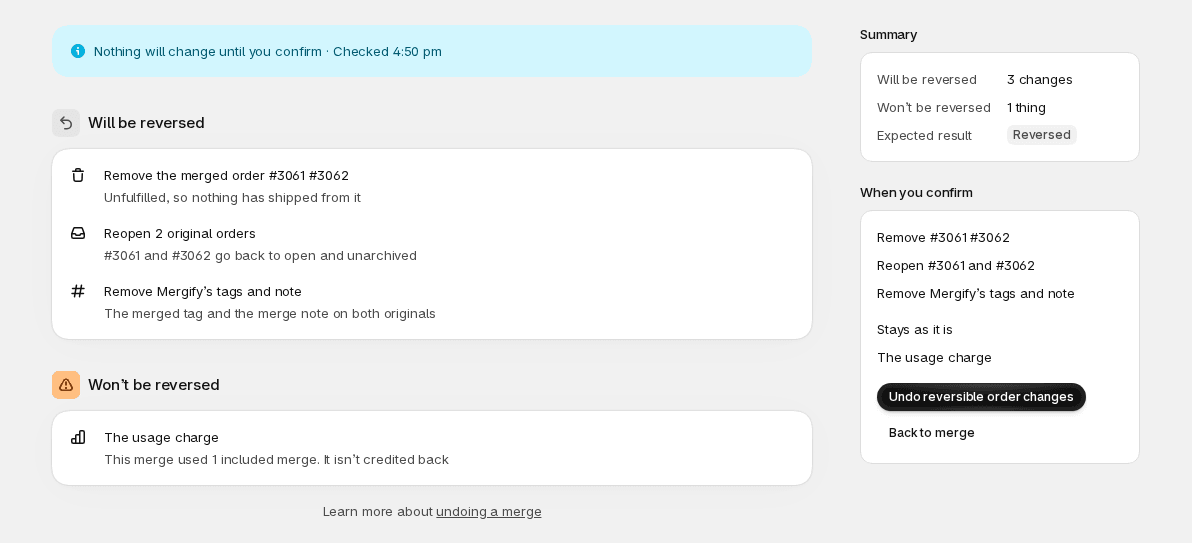
Mergify checks the merge again when you confirm. If something changed that now blocks the undo, nothing is undone and the page shows why.
When it’s done, the page reads Merge undone, or Order changes reversed — refunds remain when a shipping refund stays with the customer. Undo outcome lists each step and everything that stayed. The merge isn’t removed from History: Original merge shows it, and View OP-1042 as it ran reopens its full timeline. In History it now reads Reversed or Partially reversed, and its summary says when it was undone and by whom: “a staff member” means someone on your store’s staff, and “Mergify support” means support undid it for you.
What an undo reverses
Section titled “What an undo reverses”Undo removes the merged order first. Only then does it do the rest, together:
- Removes the merged order, or deletes the merged draft for a draft merge. It is deleted from Shopify.
- Reopens the original orders, which go back to open and unarchived.
- Removes Mergify’s tags and note from the originals: the merged tag and the merge note. It removes the text that merge added, written from the settings the merge ran with, so changing your merge settings afterwards doesn’t leave tags behind. A merge too old to have its settings recorded uses your current settings.
- Releases Mergify’s fulfillment hold on the originals, when the merge placed one, so they can ship. Holds from other apps are left alone.
The originals are touched only after the merged order is gone. If Mergify can’t remove it, nothing is changed.
The originals can show up in Orders again as long as they still qualify.
What an undo doesn’t reverse
Section titled “What an undo doesn’t reverse”Won’t be reversed lists only what applies to the merge, from these:
- Shipping refunds already issued. Refunds can’t be taken back, so if the orders ship separately the customer keeps the shipping refund. A refund still being confirmed stays with the customer if it goes through. A merge with a refund that stays reads Partially reversed.
- ShipStation, ShipBob or ShipSavvy cancellations. The original stays cancelled there. Import it again in that service if you’ll ship it separately.
- The customer email. The customer was already told their orders are shipping together.
- The usage charge. A merge that used an included merge isn’t credited back, and a merge that was charged isn’t refunded. See Plan & usage.
- Originals marked fulfilled. An original Mergify fulfilled stays fulfilled. Cancel that fulfillment in Shopify if you’ll ship it separately.
- The payment status Mergify set on a pending original.
- The shipping lines Mergify replaced. Edit them in Shopify if you’ll charge shipping separately.
When undo isn’t available
Section titled “When undo isn’t available”Review undo is dimmed and an Undo isn’t available card gives the reason. Get help with this… opens the chat with Mergify support. A merge that is already undone, or that has no merged order to remove, shows no Review undo button and no card.
| Reason | What to do |
|---|---|
| The merged order has shipped, in full or in part. | Refund from the original orders in Shopify to change what was sent: refunds always come from them. |
| The merged order is being fulfilled: its fulfillment service already has it. | Change what ships in Shopify. |
| The merged order was merged again, or an original is in a later merge. | Undo the later merge first. |
| An original was cancelled, by the merge or since. | Undo can’t reopen a cancelled order. To ship the orders separately, create new orders in Shopify. |
| The invoice of the merged draft was sent to the customer. | Deleting the draft would break the link they received, so Mergify won’t. |
| The merged draft became an order. | Change that order in Shopify instead. |
The card also appears, with a short message, when an undo is already running, and while a refund retry is running (try again in a minute). In the window for undoing several merges, a merge that is already undone or has no merged order to remove is marked Skipped with its reason.
If an undo stops halfway
Section titled “If an undo stops halfway”If a step fails after the merged order is already gone, the merge reads Needs attention. Its page lists the step that failed, for example Mergify couldn’t reopen #1040, and says the merged order is already removed. Select Retry this step, which opens Review undo again with the merged order shown as already gone from Shopify, then confirm. If the retry doesn’t work, use Get help with this….
If Mergify can’t remove the merged order itself, it tells you nothing was changed. Try again, or use Get help with this….
Undo several merges
Section titled “Undo several merges”You can undo up to a page of merges at once from History. It works on a computer, not on a phone.
- Tick the box beside each merge, or the box in the header to pick the whole page. Picking another page, view or filter clears your selection.
- The bar shows how many are selected and how many can be undone, for example 3 selected · 2 merges can be undone · 1 can’t. A merge counts as one that can be undone when it created its order and is Completed or Needs attention.
- Select Review undo (2). A window opens with each merge and its steps. Merges that can’t be undone are marked Skipped, with the reason. The window totals what will be reversed, and says how much in shipping refunds stays with the customers.
- Select Undo reversible order changes. The window shows progress, Undoing 2 of 3…, then the result: how many were undone, skipped, need attention, or not confirmed. Select Done.
Each merge is checked again just before it is undone. A merge that changed since the review is skipped and listed, and the others go ahead. For a merge that needs attention, open it and use Retry this step. For one that is not confirmed, open it to see whether the undo ran.